
When I started developing material for this month’s newsletter, How to Use Google Analytics, I knew that I wanted to include some kind of multimedia presentation showing our own analytics account as an example. I thought about using various screen capture tools to create a video, but I wanted to make sure that the analytics screens were a bit clearer and the size could be easily enlarged. At some point, Able asked our LinkedIn group about SlideShare, which prompted me to check it out. It ended up being just what I was looking for. SlideShare allows you to upload a PowerPoint presentation (I actually used Google’s version) and then sync it to an audio file, which I created using my built-in microphone and Garage Band on my mac. SlideShare doesn’t let you host the audio file on their servers, but they recommended Archive.org. I was able to quickly upload a 25MB file there and then have SlideShare stream it. Cool, right?
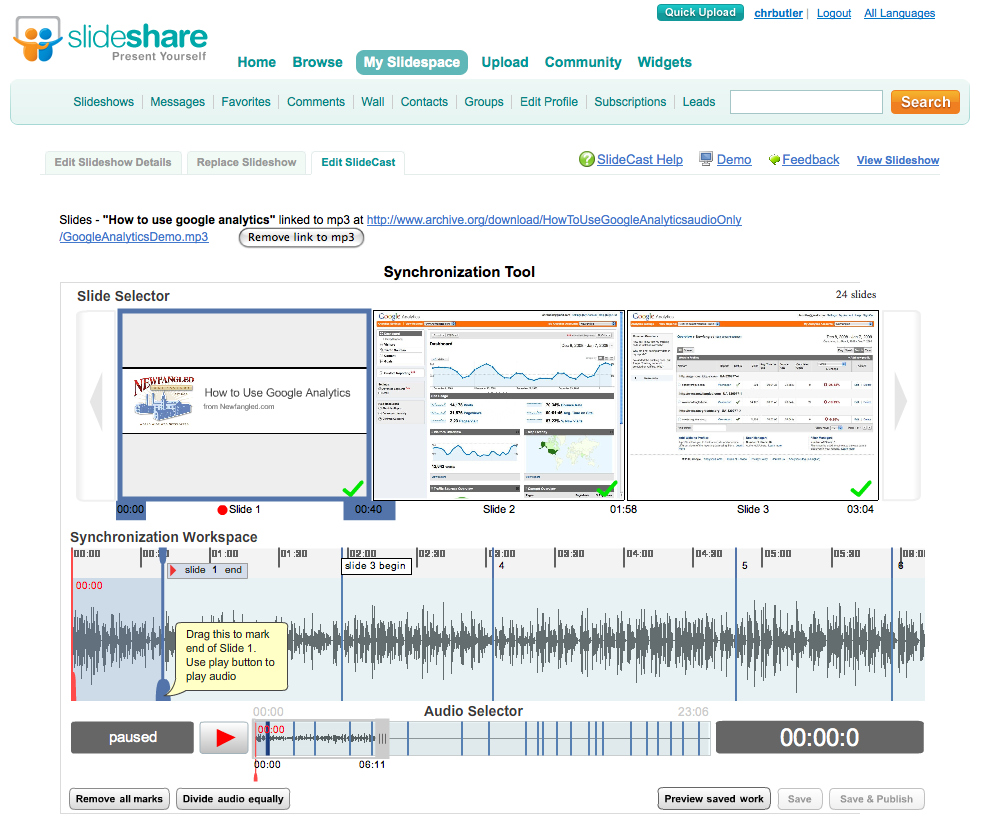
The thing that was most impressive about SlideShare, though, was the sync tool interface (see screenshot below). When editing your “slidecast,” you can actually scrub through the waveform of your streamed audio file (remember the file isn’t even on the SlideShare servers) and create sync points in relation to your slides. Very impressive. Now that I’ve used this tool once, I imagine that it could be used to create much cooler presentations than the one I did, but it’s a start.
The other thing that impressed me about this experience was that I was able to do just about everything using software in the “cloud.” I did use Garage Band to record, which is a program actually installed on my machine, but I could have used some other tools online for that if I wanted to. I used Picnik, instead of Photoshop, to edit my screenshots, and Google Presentations, instead of PowerPoint.
Related Posts
-


Christopher Butler will be a keynote speaker at the 2015 ConvergeSE conference...
-


Chris Butler will be speaking at the concluding session of the AIGA's Web101 course...
-
Chris Butler is MC'ing at this year's Hopscotch Design Festival...