Added a new KPI metric – ‘Prospect Conversion Rate’. Similar to the existing ‘Conversion Rate’ metric, this number is the number of users flagged as Prospect who completed a form on your website in the past 30 days as a percentage of the total site traffic.
When a custom KPI benchmark is added for an account, this new benchmark is shown throughout the Insight Engine wherever benchmarks are displayed. Specifically, this applies to several of the Outbound report metrics.
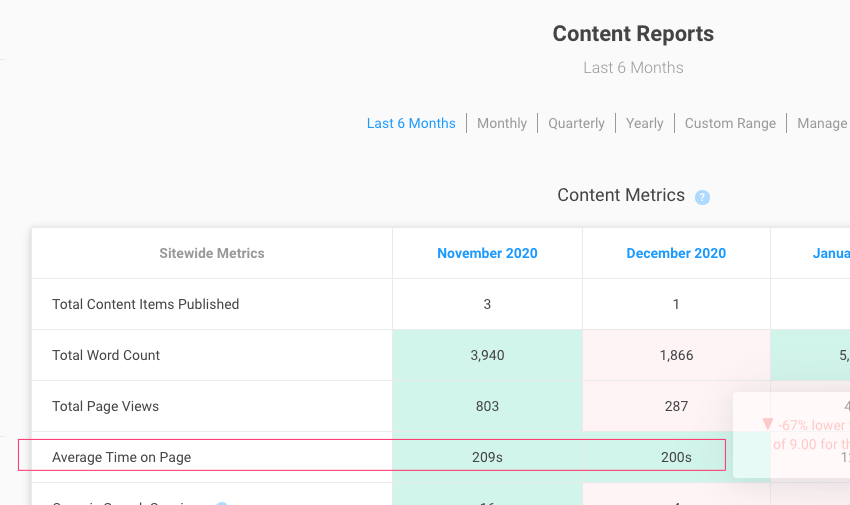
The ‘Total Average Time On Page’ metric in the Content Reports has been updated to an ‘Average Time On Page’. This is now the total average time on page for each content item, divided by the number of content items published.
We now use “total delivered” instead of “total sent” as the denominator when calculating email open and click rates in the Outbound reports.
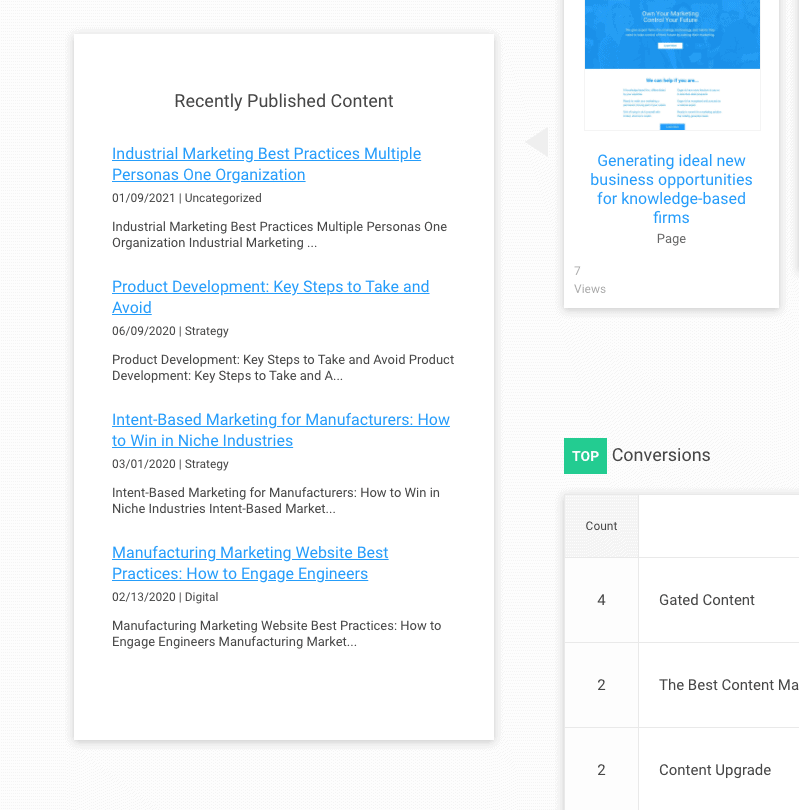
Improvements have been made to the ‘Recently Published’ report that appears on some Company detail screens. If the company has any associated RSS feeds published, this box will display a preview of recent items. This has been updated to more reliably access different types of feeds, and to include more preview text in the display.
Updates to the automatic spam filtering functionality and interface:
When a client has automatic spam filtering enabled and a conversion is identified by Akismet as spam, the lead is still marked as ‘Hidden’ and will show in the “Hidden Leads” list.
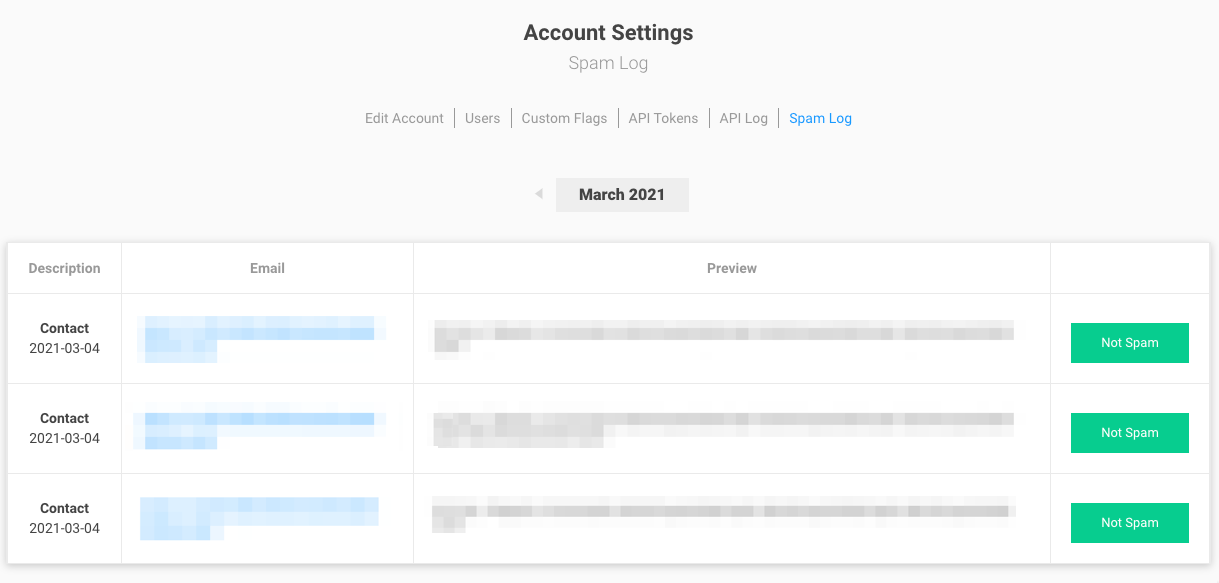
In addition, the conversion itself is flagged, and shows up under a new report in the Account Settings section called “Spam Log”. This shows (by month) a complete list of all the conversions flagged as spam, in an easier-to-scan format.
This new report offers a button to ‘unspam’ a conversion. This does several things:
Unhides the session
Marks all conversions from that session as not spam (if there are more than just the one being unflagged)
Sets a flag for the sessions so that future conversions are never marked as spam again
The existing ‘unhide session’ functionality does a similar set of steps:
Unhides the session
Marks all conversions from that session as not spam (if there are more than just the one being unflagged)
Sets a flag for the sessions so that future conversions are never marked as spam again
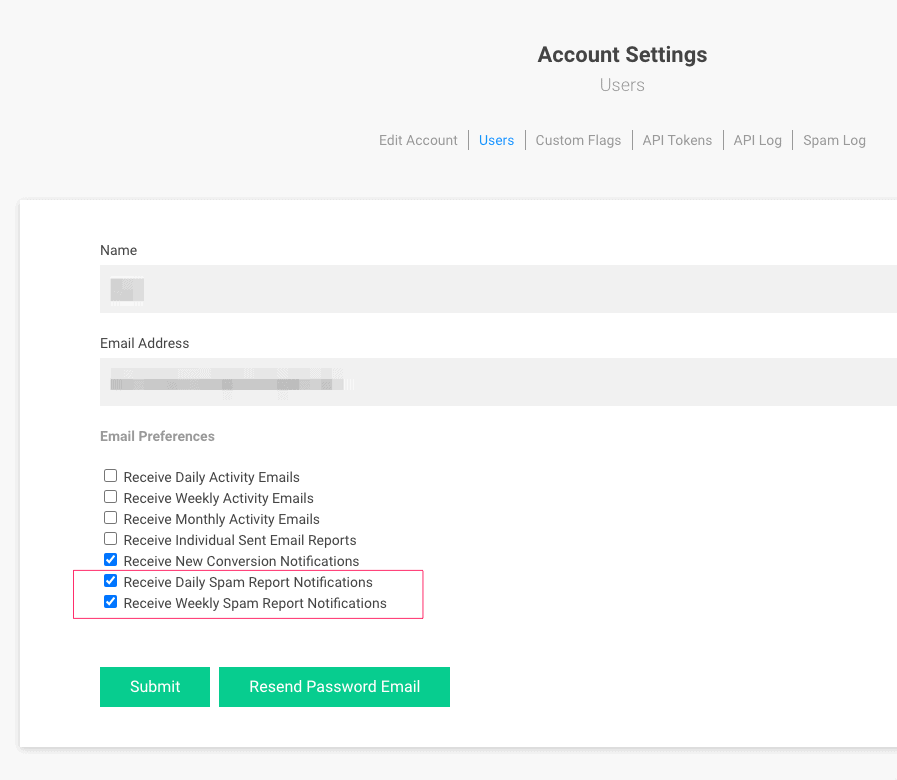
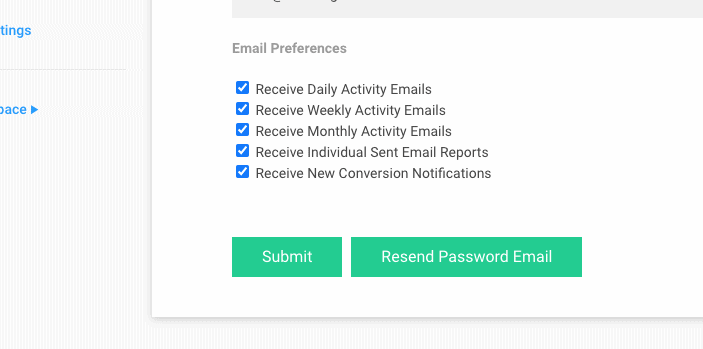
There are now two new email reports that individual users can opt-in to – a Daily Spam report and a Weekly Spam report. These will include a summary of any conversions marked as spam for that time period, with a link to the dashboard report so they may be unflagged as needed.
Updates to the user password management systems:
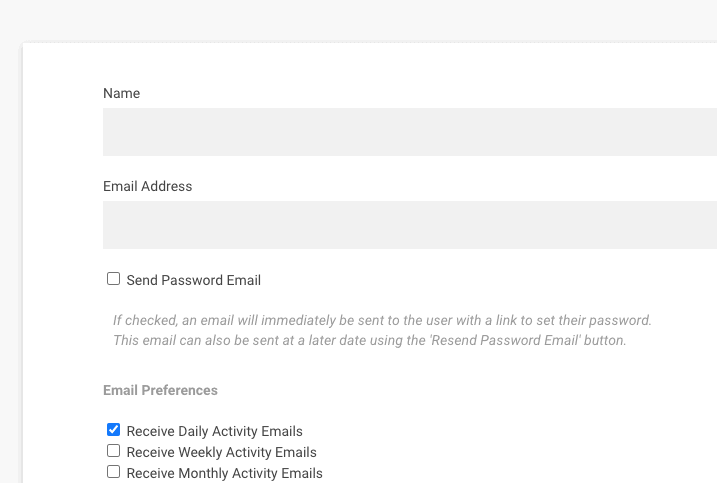
When creating a new user, passwords can no longer be set via the Add New User interface.
Instead, an optional checkbox can be checked, which will immediately send the user a welcome email, with a link to set their password.
When editing an existing user, there is a new button to resend this invite/password email
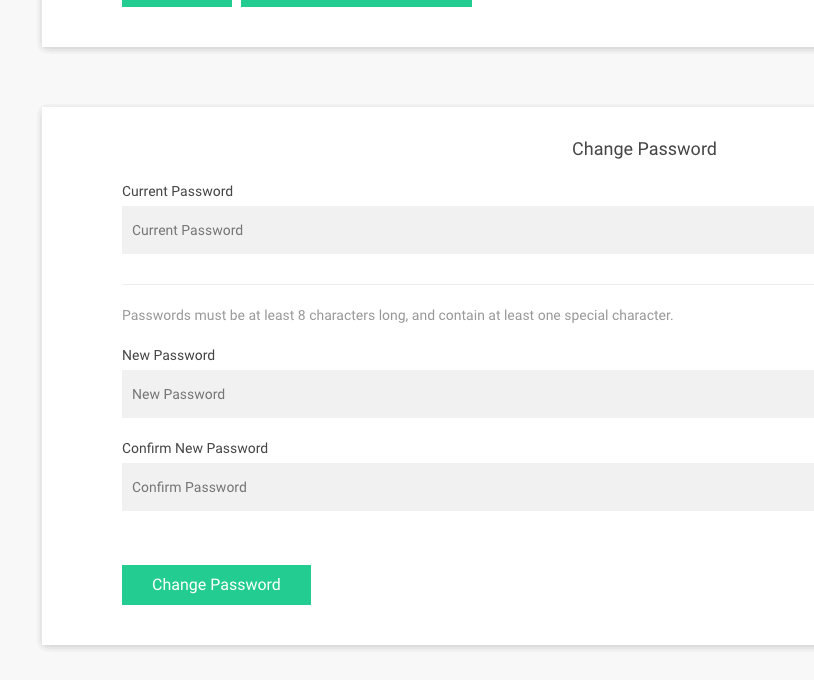
Password creation now requires a more complex password to be used – 8 characters long with at least one special character.
Users now have the ability to update their own password when logged in. This enforces the same new password complexity requirement.
Cookie Consent
We take your privacy seriously. We do not sell or share your data. We do use cookies to enhance your experience with our site and to analyze the performance of our marketing efforts. If you’d like to learn more, please see our Privacy Notice.
Cookie Preferences
Manage your cookie preferences below:
Essential cookies enable basic functions and are necessary for the proper function of the website.
Name
Description
Duration
Geolocation Config
This cookie is used to store the consent settings based on the visitor's location.
30 days
Cookie Preferences
This cookie is used to store the user's cookie consent preferences.
30 days
CloudFlare provides web performance and security solutions, enhancing site speed and protecting against threats.
The cf_ob_info cookie provides information on: The HTTP Status Code returned by the origin web server. The Ray ID of the original failed request. The data center serving the traffic
session
__cfwaitingroom
The __cfwaitingroom cookie is only used to track visitors that access a waiting room enabled host and path combination for a zone. Visitors using a browser that does not accept cookies cannot visit the host and path combination while the waiting room is active.
session
cf_chl_rc_i
These cookies are for internal use which allows Cloudflare to identify production issues on clients.
session
cf_chl_rc_ni
These cookies are for internal use which allows Cloudflare to identify production issues on clients.
session
cf_chl_rc_m
These cookies are for internal use which allows Cloudflare to identify production issues on clients.
session
__cfruid
Used by the content network, Cloudflare, to identify trusted web traffic.
session
__cf_bm
Cloudflare's bot products identify and mitigate automated traffic to protect your site from bad bots. Cloudflare places the __cf_bm cookie on End User devices that access Customer sites that are protected by Bot Management or Bot Fight Mode. The __cf_bm cookie is necessary for the proper functioning of these bot solutions.
session
__cflb
When enabling session affinity with Cloudflare Load Balancer, Cloudflare sets a __cflb cookie with a unique value on the first response to the requesting client. Cloudflare routes future requests to the same origin, optimizing network resource usage. In the event of a failover, Cloudflare sets a new __cflb cookie to direct future requests to the failover pool.
session
_cfuvid
The _cfuvid cookie is only set when a site uses this option in a Rate Limiting Rule, and is only used to allow the Cloudflare WAF to distinguish individual users who share the same IP address.
session
cf_clearance
Whether a CAPTCHA or Javascript challenge has been solved.
session
__cfseq
Sequence rules uses cookies to track the order of requests a user has made and the time between requests and makes them available via Cloudflare Rules. This allows you to write rules that match valid or invalid sequences. The specific cookies used to validate sequences are called sequence cookies.
session
cf_use_ob
The cf_use_ob cookie informs Cloudflare to fetch the requested resource from the Always Online cache on the designated port. Applicable values are: 0, 80, and 443. The cf_ob_info and cf_use_ob cookies are persistent cookies that expire after 30 seconds.
session
These cookies are needed for adding comments on this website.
Name
Description
Duration
comment_author_email
Used to track the user across multiple sessions.
Session
comment_author_url
Used to track the user across multiple sessions.
Session
comment_author
Used to track the user across multiple sessions.
Session
Google reCAPTCHA helps protect websites from spam and abuse by verifying user interactions through challenges.
Name
Description
Duration
_GRECAPTCHA
Google reCAPTCHA sets a necessary cookie (_GRECAPTCHA) when executed for the purpose of providing its risk analysis.
179 days
Google Tag Manager simplifies the management of marketing tags on your website without code changes.
Name
Description
Duration
td
Registers statistical data on users' behaviour on the website. Used for internal analytics by the website operator.
session
cookiePreferences
Registers cookie preferences of a user
2 years
Statistics cookies collect information anonymously. This information helps us understand how visitors use our website.
Google Analytics is a powerful tool that tracks and analyzes website traffic for informed marketing decisions.
ID used to identify users for 24 hours after last activity
24 hours
_gat
Used to monitor number of Google Analytics server requests when using Google Tag Manager
1 minute
_gac_
Contains information related to marketing campaigns of the user. These are shared with Google AdWords / Google Ads when the Google Ads and Google Analytics accounts are linked together.
90 days
__utma
ID used to identify users and sessions
2 years after last activity
__utmt
Used to monitor number of Google Analytics server requests
10 minutes
__utmb
Used to distinguish new sessions and visits. This cookie is set when the GA.js javascript library is loaded and there is no existing __utmb cookie. The cookie is updated every time data is sent to the Google Analytics server.
30 minutes after last activity
__utmc
Used only with old Urchin versions of Google Analytics and not with GA.js. Was used to distinguish between new sessions and visits at the end of a session.
End of session (browser)
__utmz
Contains information about the traffic source or campaign that directed user to the website. The cookie is set when the GA.js javascript is loaded and updated when data is sent to the Google Anaytics server
6 months after last activity
__utmv
Contains custom information set by the web developer via the _setCustomVar method in Google Analytics. This cookie is updated every time new data is sent to the Google Analytics server.
2 years after last activity
__utmx
Used to determine whether a user is included in an A / B or Multivariate test.
18 months
_ga
ID used to identify users
2 years
_gali
Used by Google Analytics to determine which links on a page are being clicked
30 seconds
Insight Engine is Newfangled's first-party analytics tool. It records page views, traffic source, and session activity so we can understand how visitors use the site and measure marketing performance. Data stays first-party and is not sold or shared with third parties.
Marketing cookies are used to follow visitors to websites. The intention is to show ads that are relevant and engaging to the individual user.
Act-On is a marketing automation platform. Its tracking beacon records page visits and associates them with lead and email-campaign records to support and measure our marketing.
Clearbit (now part of HubSpot as Breeze Intelligence) uses your IP address to identify the company you are visiting from and provide firmographic data for B2B marketing and analytics.
Used by Google Ads for conversion linking, associating ad clicks with on-site actions.
90 days
The LinkedIn Insight Tag enables analytics, conversion tracking, and audience building for our LinkedIn advertising. It may set cookies used to measure ad performance and for retargeting.