
BLOG | MAY, 2010 My Web Reading Processby Christopher
I still consider myself a student. I love to read, and there are more things I am interested in learning about than I can keep up with while still doing my job well. But part of doing my job well is staying informed so that I can inform our staff and clients. So, I've been continually refining my web reading process for a few years now, trying to make it as simple and as helpful as possible. I've been asked (by clients, colleagues, friends and family) how I do it enough times recently that I thought putting it down in a blog post would make for a helpful resource. (If it is helpful, please let me know.) This system isn't perfect, and I'm sure it won't be ideal for everyone. That said, here goes... Choosing and Using the Right InboxI'm assuming that you already have things you're interested in learning about and/or have identified particular sources you'd like to draw from. Rather than going to those sources when you have time to read, my suggestion would be to use an RSS reader to bring that content to you when it's published. If you're unfamiliar with how RSS and RSS readers work, check out the newsletter I wrote a few years ago on using RSS. I think Google Reader is the best one out there, so my post is based upon using it. I use Google Reader only as an inbox. I don't actually do any reading there; I simply use it as a way of bringing new content from the sources I've chosen to me so that I don't have to think about checking up on them. I subscribe to a pretty large number of sources, so I'm never really at a loss for content to read. In fact, it's so much that I have to be a pretty discerning scanner.
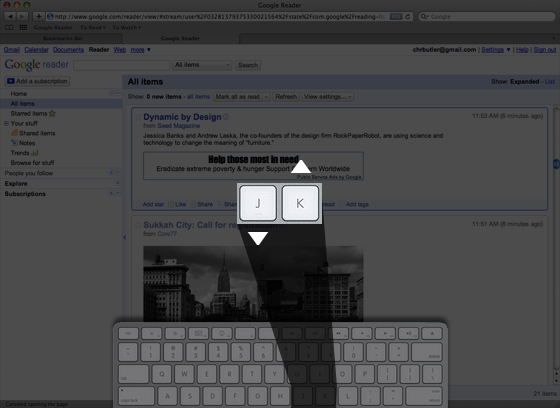
Thankfully, Google Reader allows you to use your keyboard to quickly advance through the unread content it has brought in. Hitting the "J" key advances you through that content, marking entries as "read" as you go. Hitting the "K" key moves you backward (see image above). Because I have so much content coming in, I do this very, very quickly. Moving Content Out from the Inbox
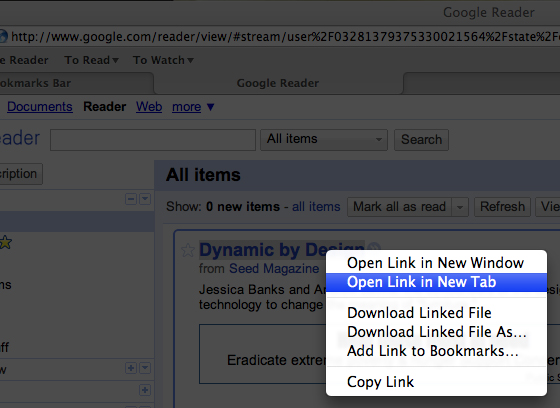
When I find something I do want to read, I open it in a new tab (shown above), then continue scanning through the unread content. I do this until I've opened everything I want to read in new tabs and have no unread items left.
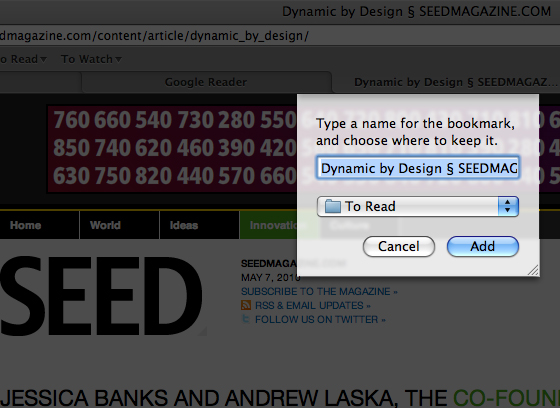
Most often, I don't actually have the time to read the content I've selected, so once I'm finished going through everything new in Google Reader, I start bookmarking the content I've opened in new tabs (shown above). I have a simple bookmarking structure with only a few options: "To Read," "Read," "To Watch," "Watched," and "Commented." I know that I'll probably have time later to read some of the content I've chosen, so I save the pages I've opened to my "To Read" bookmarks folder. Reading, Really Reading
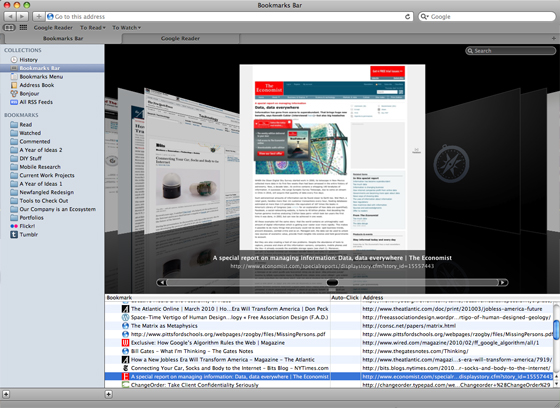
I try to set aside some time every day to read. When that time comes, I start by opening content that I've saved to either my "To Read" or "To Watch" folders (see above).
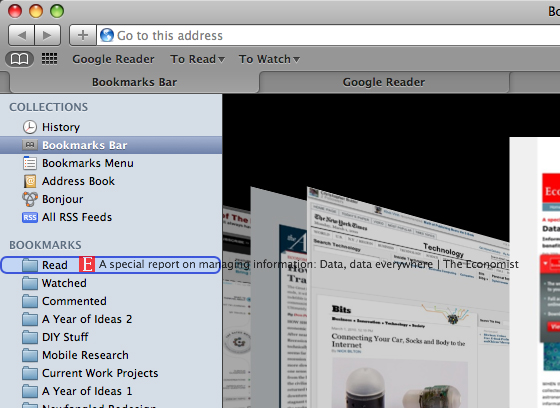
Once I've read or watched that content, I literally drag it from "To Read/Watch" and drop it into "Read/Watched." (Shown above.)
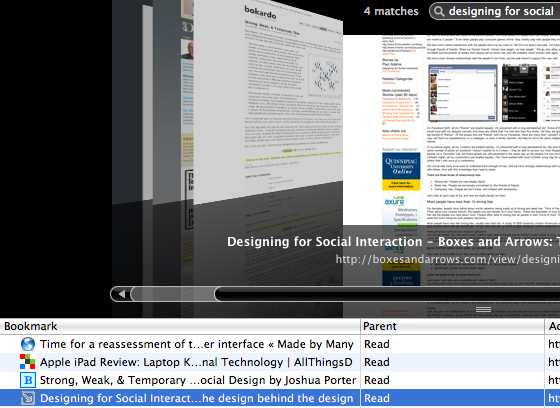
Keeping a record of what you've read may not be that important to some, but for me, it's essential. I often need to refer back to this material, so being able to access that specific subset of the content that orignally came through Google Reader is important. Using Safari's bookmarks window, I can search my read material very easily (see above). Just the other day, I was having a conversation with a coworker about design conventions within social networking tools, and recalled an article I'd read about that topic. I couldn't remember it's title or the website it was from, but I searched my read material and quickly found the original article from Boxes and Arrows.
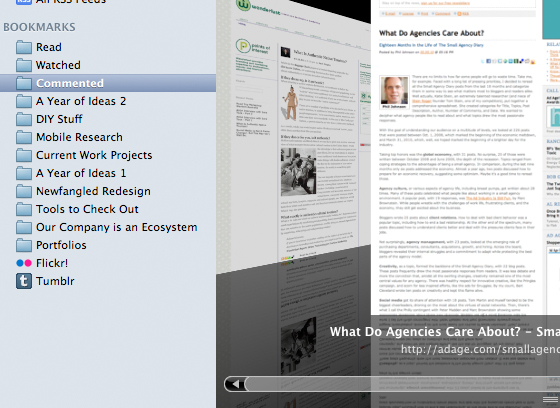
As I mentioned, I also keep a folder for all the articles I've commented on (see above). Some sites have functionality that allows me to choose to receive an email alert whenever someone else comments on an article that I've commented on, but many don't. Because I comment on so many, it would be very easy for me to forget to check back on that article to see if the author or other readers replied to my comment. Having this record lets me easily follow up and continue conversations around content I'm interested in.
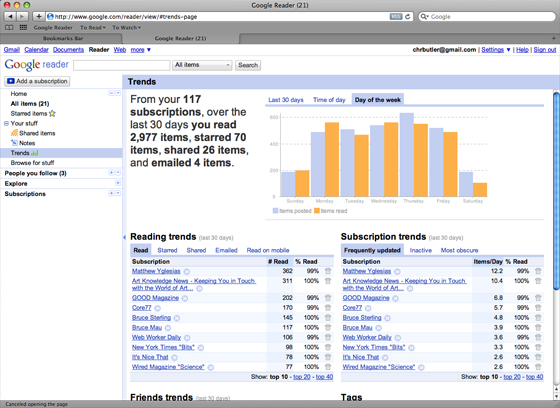
Finally, I use Google Reader's trends view (shown above) very often to prune my subscription list. It's helpful to see what my own use patterns are for this tool—specifically, what days and times of day I'm most active with it—and which subscriptions are most active or inactive. Because scanning through Google reader marks every item as "Read," the trends report of what content I read or don't read isn't actually that accurate. As far as Google Reader is concerned, I "read" through everything, even though I only open some material in a new tab to actually read. In order to use the Trends view to see my reading patters, I use stars to indicate posts I open in a new tab and read later. Reading Takes TimeThe second question I'm usually asked is how long this kind of thing takes. There are really two answers to this question. The amount of time I normally spend on the organizational part—sorting through the feeds in Google Reader, opening the ones I want to read, then bookmarking them appropriately—probably takes about 15 minutes a day, depending upon how many items are unread. Actually reading this material, though, is pretty unpredictable. I probably spend about an hour each day reading, though that often happens early in the morning or in the evening. The chances of me having actual reading time during the work day are pretty slim. But if i do have downtime, I will open up that "To Read" folder and see what I can read with the time I have. If I factor in engaging with some of this content—whether by commenting on it or sharing it with others—that probably adds another 15 minutes. So, in total, I probably spend an average of 1.5 hours a day (7.5 hours a week) on this kind of thing. |
Hi there. I really enjoyed this article, as I'm kind of disorganized when it comes to reading. I subscribe to over 250 feeds, in addition to the > 100 people I follow on twitter,
Typically I set aside an hour or two each day to go through google reader, open interesting articles in tabs (like you do) and clicking through interesting links from my twitter feed. Then I go through and look at all of them. If an article strikes me as particularly useful, then I bookmark it with Delicious.
That's just what works for me, I can definitely learn from how you organize your bookmarks so you know what you've already read and/or commented on.
Interesting seeing how others read on the web. I have found that Instapaper has become an essential part of my reading process, and I find a lot of useful stuff on Twitter that I save to read later.
Max: Sounds like you've got a good system for dealing with a pretty substantial amount of input. As you say, there's definitely more than one way to do this, the main goal being to use your time as efficiently as possible.
Mark: I've tried out Instapaper but just haven't stuck with it. I know some people who find it really useful to collect web articles and then transfer for print using things like Lulu.com (something I've done a couple of times but not using Instapaper). Thank you both for reading and for your comments!
This system works for me too, however i prefer Tags over Safari bookmarks
As a productivity nut, I so appreciated your documenting your reading process. I moved away from Google Reader to Netvibes; however, I find myself not checking it as often as I'd like and will blame Twitter for that. One of the best ways I stop tab overload is to copy the URLs into a Calendar appt in Outlook. I copy the items I want to read thoroughly into a schedule Reading appt.
I use delicious.com for recall, and I started using Evernote to capture thoughts from pieces I read. I'm bookmarking this post now!
Nice work here. Appreciate you documenting your process.
I currently use Google Reader as well and open things up in tabs in the background. However, I usually save everything to Instapaper immediately and then come back to it.
I also do the same with Twitter, having lists setup to be read through while saving content to Instapaper to read later.
The thing that really blows is when I miss a day. My Google Reader and Twitter lists can easily exceed thousands of items then. Then it becomes a pain to deal with.
Thanks for posting this!
I'm really bad at organizing my daily reading routine. I save a lot of articles on Delicious, but almost never go back and read those articles. I will give your method a try Chris. With the Foxmark addon for Firefox, it'll hopefully give me the read flow I've always, subconsciously, wanted.
Thanks for sharing Chris.
I go through spurts of super-reading (4 hours to clear my reader inbox) then I fall behind, then catch up...
Eventually I just have hundreds of "toreads" tagged in delicious, but no time to read them, since there are always more "new" items to go through. Add on top of that time to sift through and follow-up on tweets and the occasional link from an email.
Oh, and then the newspapers!
Oy....
Useful hearing your method. I always feel like things are slipping by me that I would like to spend more time looking at. Will give this a try. Thanks!
I can really recommend READ IT LATER as a browser plugin.
I personally use it with Firefox as an Addon. First i use the
addon BRIEF to just assamble the Feeds. Then every article
that i want to read i just have to click the READ IT LATER
Button in the Status Bar and it is saved. Then i can choose
from the Drop-Down later when i want to read. Very fast
und thanks to the search-function even more awesome :)
Great article. I still also consider myself a student. The industry is moving so fast and to keep up with it I spend at least 1-2 hours a day reading and I use the exact same method as you. Bookmark an interesting article when i see it and read it later.
For a while I have often wondered how other people do this. It is nice to know I am not the only one and that someone else uses the same methods as me.
Krzysztof: Tags are not a bad system at all. I used to use Del.icio.us for this but I found that the way the site paginated my tagged links made it a pain for me to access much older ones. Plus, I got really hung up on the tags themselves—since I'd tag them as I saved them, I ended up with way too many tags, which wasn't helpful in identifying larger trends. Now, by limiting to "To Read/Watch" or "Read/Watched," I only have two groups. As I go through them later, I can categorize them with a bit more "big-picture" restraint.
Dana: That's a really interesting use of your calendar! I've never thought of doing something like that, but it's not a bad idea—particularly if your schedule is very tight. I've also heard many good things about Evernote. I have an account, but I've just never gotten used to actually using it.
James: I know exactly what you mean. One of the first motivators I had to prune my subscription lists was coming back from business trips and having, like you, hundreds (if not in the 1000+ range) of unread items in Google Reader. I felt way too burdened by it—no way to live! All that stuff couldn't possibly be essential. So I drastically reduced my subscriptions, and boy do I feel great. Ok, enough of the infomercial...
Christer: I've never used Foxmark—maybe I'll check it out. Thanks for the tip!
Alex: I hear you, I hear you. But wow, 4 hours to clear it all out! That's a long time!
Wendy: Glad you found it helpful! By the way, your paintings are really beautiful!
hmm: First of all, "hmm" very cryptic name! I'm wondering whether to read this in a skeptical way (like, "hmm...really? You really think there's a vast, global conspiracy fueled by an alien reptoid bloodline?") or more lightly, like the "hmm" in that song, "Things that Make You Go, Hmm." On that note, you should receive the award for eliciting a reference to C&C Music Factory—something I never would have guessed I'd do... Thanks for sharing your process. I'll have to check out the Read it Later plugin.
Sebastian: I'm with you on the speed thing. We often talk about the web being a work in progress around here, but the speed with which it changes can be disorienting sometimes!
Thanks, everyone, for your comments!
Do you manage to get through your "To Read" folder on a regular basis? Or do you just fall farther and farther behind?
Kartik:Well, right now I have 26 items in my "To Read" folder, and I can't remember the last time it was empty ;-) But I do tend to keep the list cycling through.
Hi there!
I also use the "Read it later" plugin. There is a version for Chrome too (it's called "Orbvious Interest ", if you're interested)
The good thing is, it syncs with a web app, so you can use it on almost every device provided with Internet connection, not only on your laptop - that makes it a very useful tool.
I struggle with this also but have lately been getting on top of a good workflow. I think the trick here is to not treat adding an article to your reading cue as if you have already read it. Your only moving it within your system and not processing it properly.
I get my links from RSS feeds via Google Reader and Twitter, use ReadItLater and then if I wish to refer back to the page at some point it gets added to Delicious but with a strict tagging method. If I come across information such as a photoshop tip or step by step tutorial that I wish to add notes or strip down to suit my own ability, I clip the page to Evernote, place the note in the correct Notebook (eg Post Processing Techniques) and then assign tags. The tagging method here is the same as if it were for Delicious which creates consistency and clarity when moving between the services.
I used to just throw things around with the mindset of " I'll get to it later, or when I need to know I will dig it out to read". I now am very careful about what gets added to my archive - Delicious for dynamic content, Evernote for static, as if I ever need a complete reading history for reference it is all there in my ReadItLater account. I'm also careful about keeping my subscription points to a manageable figure so I often will subscribe and unsubscribe after assessing if the content is valuable enough to eat into my 'information quota'.
There are some great integrations between the services I use, especially Twitter for iPhone with ReadItLater, and i'm hoping that with discipline and consistency I will be able to sit down with my (future) iPad in the morning over breakfast and be at inbox zero without any real 'work' on my behalf.
great post
yarn... number you've read is what i;ve read by breakfast. Seriously 1/30 of my reading feed. For the record i still get inbox to 0 everyday.
From your 557 subscriptions, over the last 30 days you read 70,972 items, clicked 416 items, starred 2,424 items, shared 1,095 items, and emailed 0 items. Since July 21, 2010 you have read a total of 300,000+ items.
But yes, agree having good strategy on how to tackle the whole find, acquire, sort articles is a key to dealing with info overload.
Tristan, Wow, sorry if I offended you. Just thought it might be helpful to share some info overload techniques with our readers.
Oh wait, now that I've looked at your site, maybe you were being serious?
Hey Chris, very helpful post! I'm just getting into readers, and I would REALLY like to find a magic tool that:
a. Collects my RSS feeds
b. Lets me bookmark pages
c. Let's me make some notes on the articles/ posts I want to keep.
Any idea of something like this exits? It looks like everyone in the comments uses a reader for one thing, a bookmarking or clipping site for another, and I don't see any tools that allow you to pretty easily just add a note to an article. I'm thinking sticky note style. I've been searching around and coming up blank.
Taking a look at your process is hugely helpful, so thanks again for sharing!
Katy,
Have you tried using Diigo (http://www.diigo.com/)? I haven't used it in a few years but I believe it let's you annotate pages wherever you want on the page (like sticky notes) that you can see when you're logged in to the service. It also allows you to save bookmarks--should be a great research tool. The only thing it wouldn't replace is an RSS reader. But as I mentioned, I only use mine for delivery. The rest happens elsewhere for me.
Thanks for reading!
Thanks! I really appreciate the tip, and I'm going to check it out. Also, I love the blog. You have no idea how helpful it is - I always check here first for any and all online communication questions I have :)